
Every report starts by asking which period you want to look at. Most reports use the same Quick Date controls at the top of the page.
Quick Date options
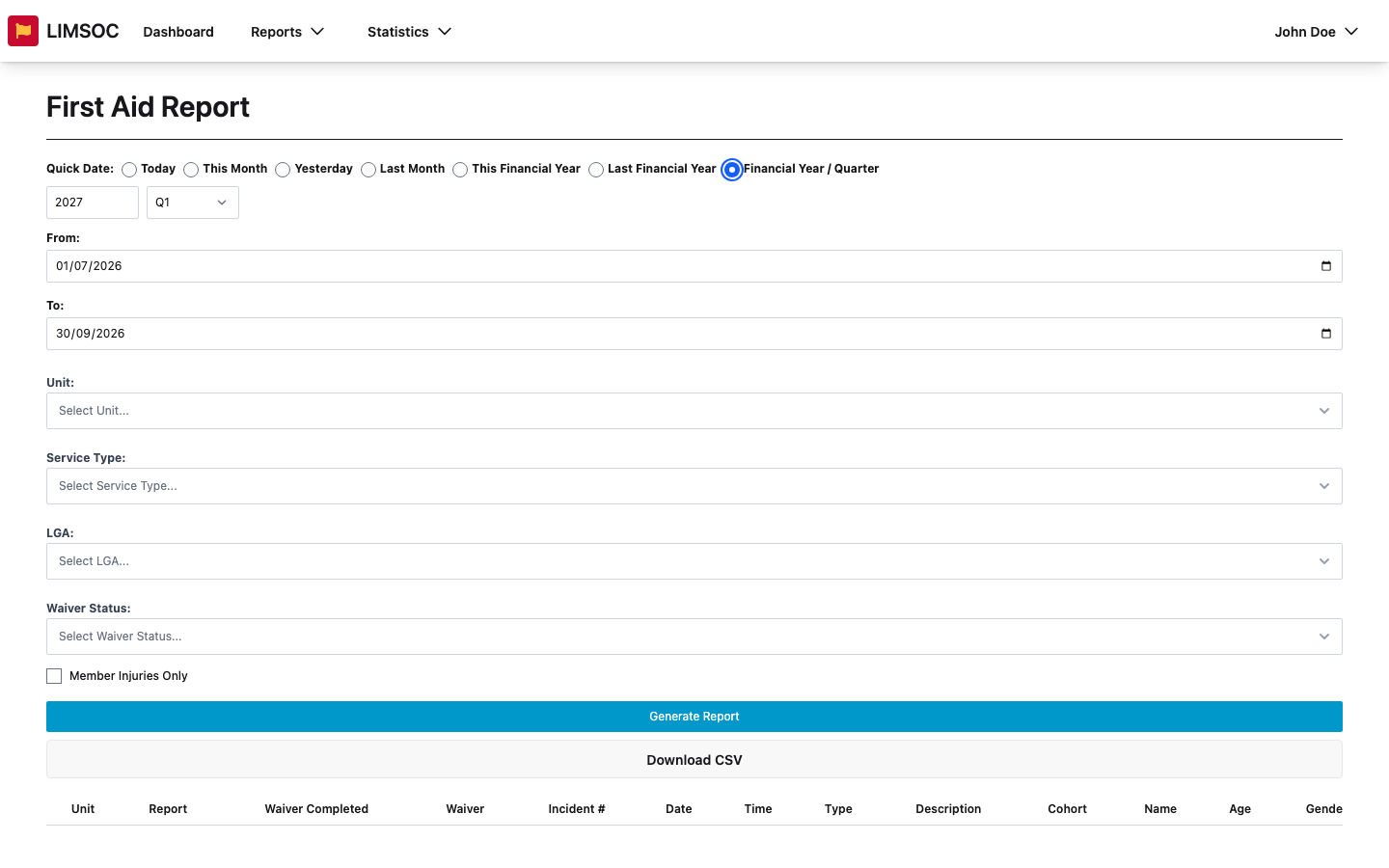
Choose one of Today (the default), This Month, Yesterday, Last Month, This Financial Year, Last Financial Year or Financial Year / Quarter. Picking one fills in the From and To dates for you. You can also type your own dates into From and To for any custom range.
Financial years and quarters
LIMSOC uses the Australian financial year, 1 July to 30 June. When you choose Financial Year / Quarter, a year box and a quarter list appear:
Q1 = July to September
Q2 = October to December
Q3 = January to March
Q4 = April to June
The year is the year the financial year ends. For example, 2027 Q1 covers 1 July to 30 September 2026. Check the From and To dates to confirm you've got the period you meant.
On the Dashboard
The Dashboard uses a period button instead of Quick Date. It has the same options plus This Week and Last Week. You can also set custom dates in its filter panel, and the period then shows as Custom.
Tips
Changing the dates doesn't refresh a report by itself. Click Generate Report again.
The Activity Log works one day at a time and has its own date picker. The Medication Vaults overview always shows the current state, so it has no dates.
For big reports such as a full financial year, generate once and download the CSV rather than scrolling the on-screen table.