
Most incidents are created by Surfcom and your unit is linked to them. Some units can also raise an incident themselves. If yours can, you'll see Create Incidents in your unit's menu. If you can't see it and think you should, contact your administrator.
1. Open Create Incidents
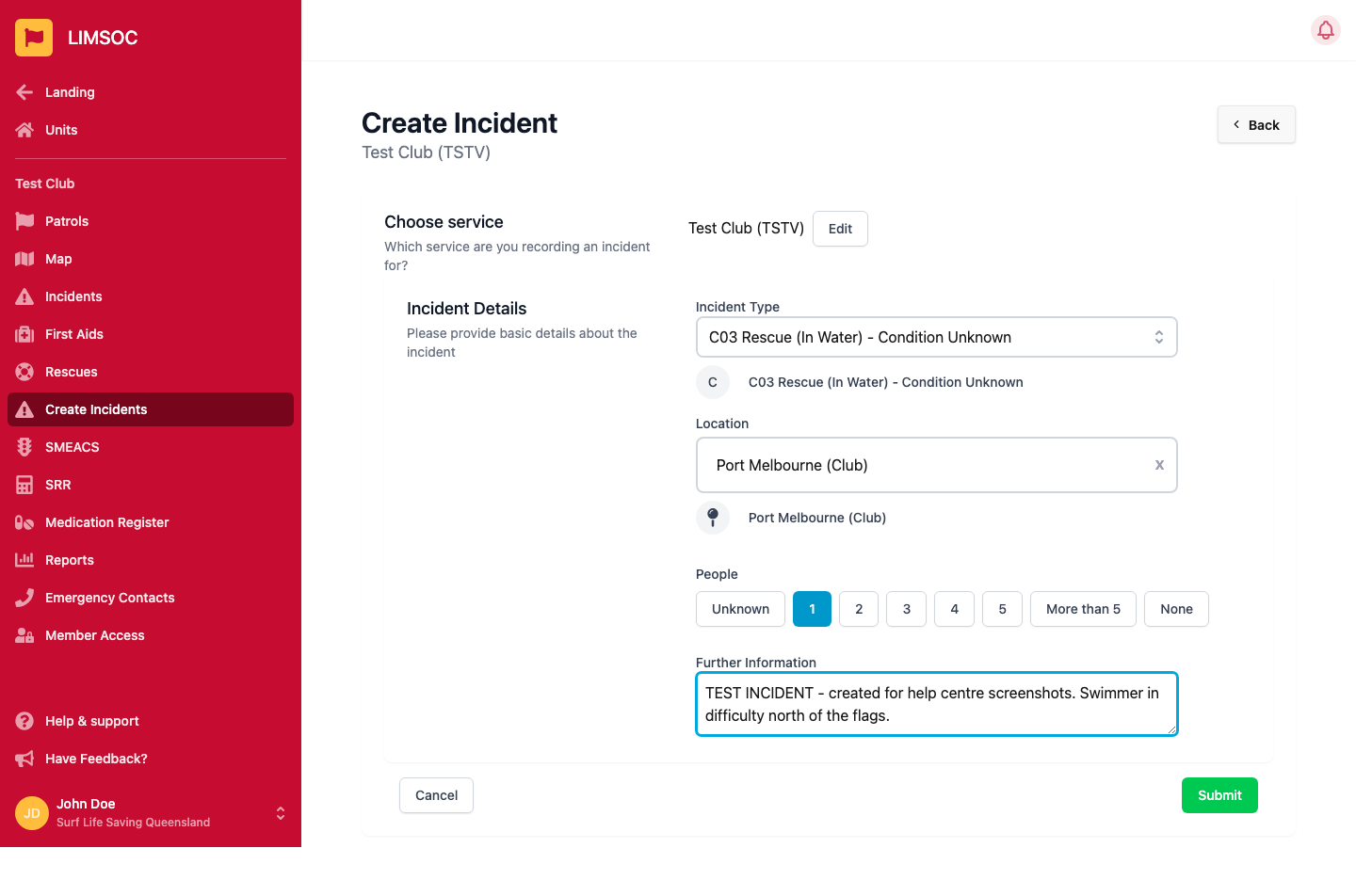
Select Create Incidents. Under Choose service, check the incident is being recorded for the right unit. Use Edit to change it.
2. Enter the incident details
Incident Type: start typing to search the list.
Location: defaults to your unit's location. If the incident is somewhere not on the list, choose OTHER and type it into Other Location.
People: how many people are involved (Unknown, 1–5, More than 5, or None).
Further Information: anything Surfcom should know.
3. Submit
Click Submit. The incident is created with your unit as the primary service and marked On Scene, and Surfcom is alerted. You're then taken to your Incidents screen, where you can add the IRL, first aids and rescues for it (see Viewing Your Unit's Incidents).
Creating an incident in LIMSOC doesn't replace radio or phone contact. For anything time-critical, contact Surfcom directly as well.